How Kenii looks and sounds
Use this guide when you write about Kenii, build with Kenii, or put the Kenii name next to yours. It is the live system, so it is never out of date.
Built for community colleges
Connecting the dots
The K is the spine of a book, with its pages opening to form the letter. The two dots sit at different heights, like an instructor speaking with a student. Both are adults, so the shift is one of tone, not rank. An animated version, with the pages opening, is planned.
Keep free space on every side equal to the height of the lowercase “e”. Never stretch, rotate, recolor, or add an effect.


Logo color use
Four grounds, two ink colors. Ink on light grounds. White on dark ones. Nothing else touches the mark.
Color palette
One violet does the work. Lime marks one thing at a time. Everything else is quiet ink and warm neutrals. Contrast is measured, not guessed.
Color rules
Four rules keep the palette calm. The last one matters most: pair every color with a word and a shape, so nobody has to tell colors apart to read it.
- 01 Violet leads.
- 02 Lime is a pinch.
- 03 Muted ink never carries text.
- 04 Color never works alone.
Inter
One family, no second typeface. Size and weight carry the hierarchy. Headlines run tight. Only the uppercase label opens its spacing.
ABCDEFGHIJKLMNOPQRSTUVWXYZ abcdefghijklmnopqrstuvwxyz 0123456789 $%&@#?!
- Light 300
- Regular 400
- Medium 500
- Semibold 600
- Bold 700
- Black 900
The scale
Four sizes do almost all the work. Headlines balance their lines. Body text never ends on a lone word. Numbers use tabular figures so columns line up.
Room, and quiet edges
Space is the main tool. When a section feels tight, take something out. Never shrink the gap. Edges stay soft, shadows stay faint, and focus is always visible.
The parts
Full pill buttons, at least 44 px tall, with one primary action per view. Cards hold one idea. A headline gets one highlight, at most.
Eyebrow
Students find the right program
- One idea per card A border, not a shadow. One action.
- Same fields, same order So a grid scans as a grid.
Real people, bright daylight
Every photo shows the person who would really use that screen, and it always sits next to a piece of the product. Bright daylight, a close crop, a soft background and a real smile.
-
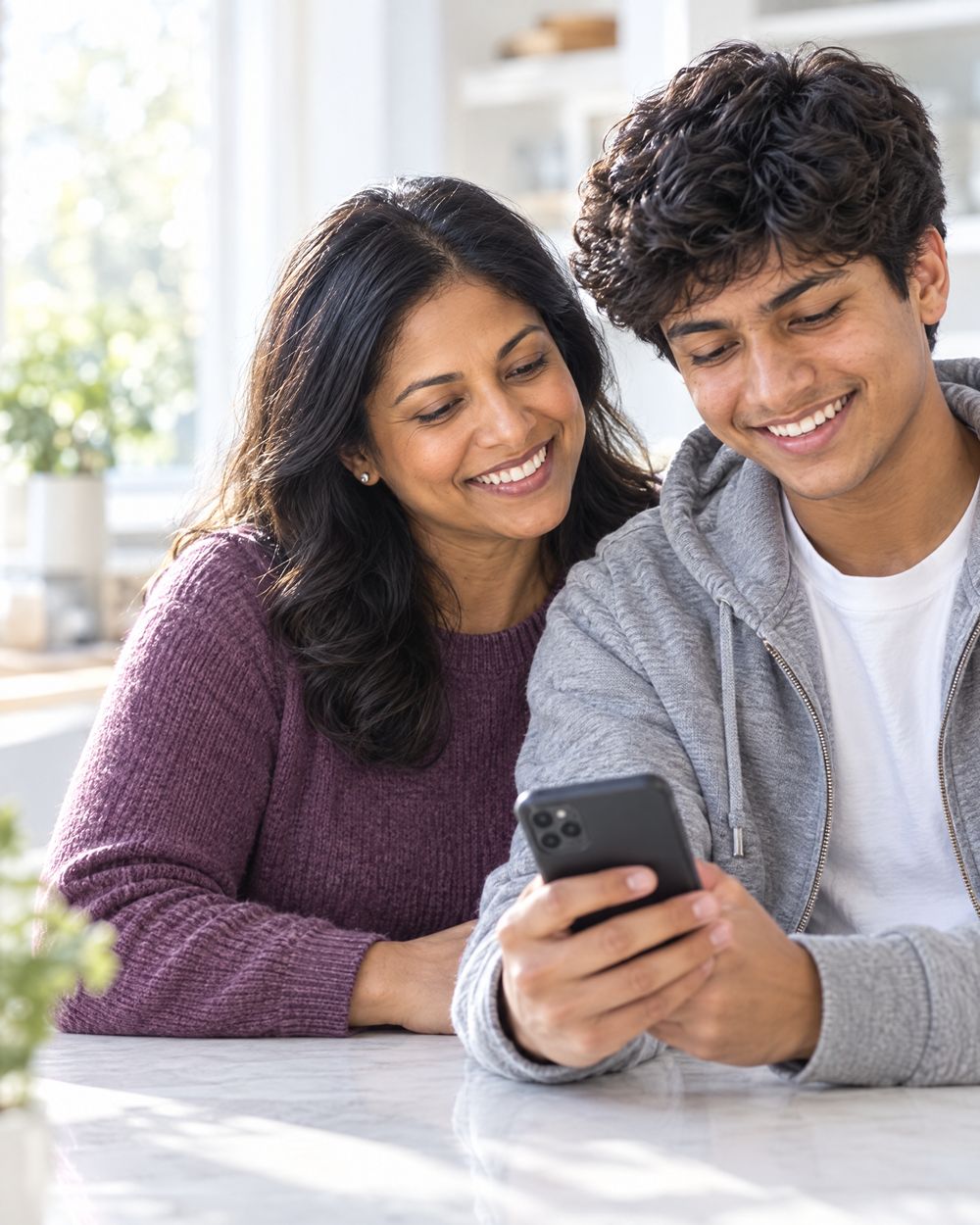
A student and a parentOn a phone, candid
-

A catalog coordinatorOn a laptop, candid
-

A deanLooking at the camera
Photo rules
Five rules keep every photo in one family, whoever makes it. Pick the person first, from what the screen is for, then the device and the place.
- 01 Pick the person from the screen.
- 02 Bright daylight. Never moody.
- 03 Close crop, face up high.
- 04 Purple on two in three.
- 05 No text, logos or screens.
Shoot this, not that
Most people are caught in the moment, eyes on their phone or laptop. About one in three looks warmly at the camera. Never the same person twice on one page.
ShootA registrar smiling at her laptop by a window.
SkipA team grinning at the camera in a dark office.
ShootA student on her phone on a sunny walkway.
SkipA handshake over a desk.
ShootA dean reading a tablet, a lilac scarf.
SkipA logo, a slide or a readable screen.
Make one
Generate at 4:5 and 2K with the three homepage photos as style references. Fill in the brackets, then export a 1000 by 1250 JPEG at quality 80.
Match the photographic style of the reference images exactly: bright high-key natural daylight, clean airy look, soft creamy out-of-focus background, subject close and filling the frame from the waist up, genuine warm smile, crisp modern lifestyle photography. Plain real photograph only, no graphics or overlays. Do not reuse the people from the references. New photo: [role, age, background, clothing], [what they are doing, on which device], [where, in bright daylight]. [Candid, eyes on their phone or laptop] or [looking warmly at the camera]. The person is centered in the frame with the face in the upper third. No readable text, no logos, no visible screen content.
Check every result before use. Hands, phones, badges and stray graphics are where generated photos go wrong. Never use a real customer's or college's photo.
Plain, calm, specific
We write for busy people at colleges. Short sentences. Real numbers. We say catalog, program, student and pathway. We skip leverage, seamless and cutting-edge.
WriteStudents find programs faster.
SkipRevolutionary student discovery.
WriteLive at Martin Community College.
SkipTrusted by leading institutions.
WriteIt reads your catalog.
SkipLeverage AI-powered synergy.
Need something we did not cover?
Write to the team and we will send what you need.